Posts: every post in one list
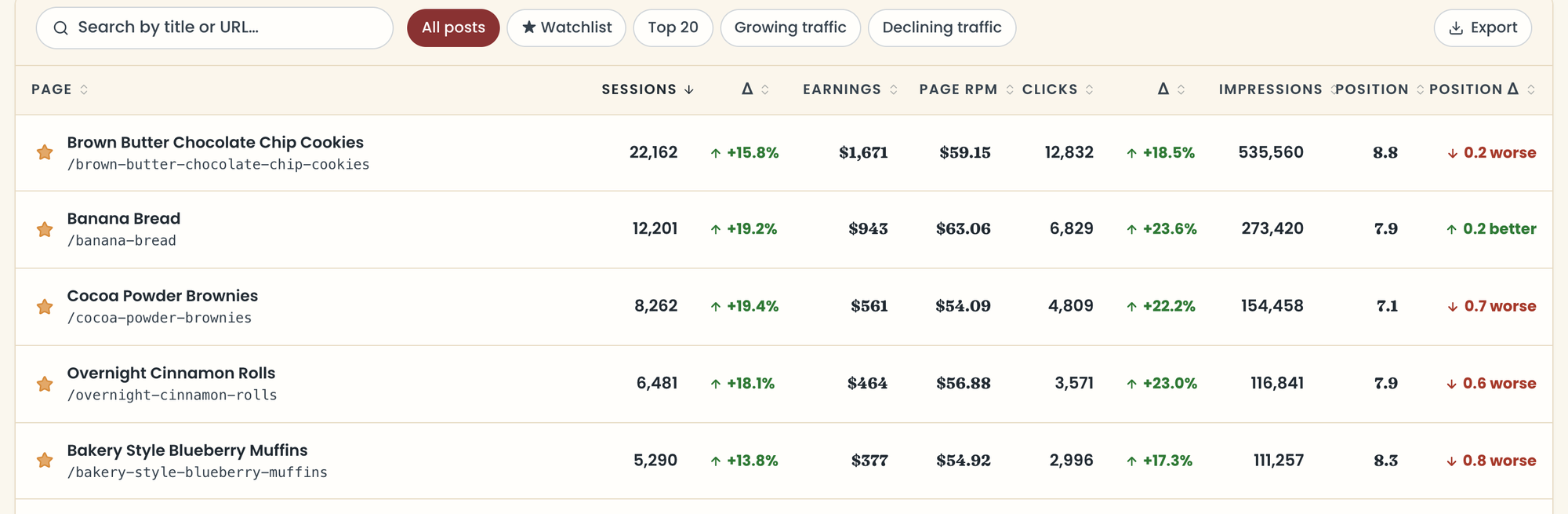
Posts lists every post with sessions or Google impressions in your dates, with how it's doing. Here's what you can do with it.
Find a post
- Search by title or address.
- Filter with All posts, ★ Watchlist, Top 20, Growing traffic, or Declining traffic.
- Click any column to sort by it.
- Click a post to open its page. Cmd-click (Ctrl-click on Windows) opens it in a new tab. See What's on a post's page.
- Press Cmd+K (Ctrl+K on Windows) from anywhere to jump to any post.
What do the columns mean?
Sessions and Clicks (Google search clicks), each with its change (Δ). Impressions is how often the post showed in Google. Position is its average spot in Google, and Position Δ says whether it moved up ("better") or down ("worse"). With Raptive, you also see Earnings and Page RPM.
Which posts are listed?
Posts with any sessions or Google impressions in your dates or the comparison. Tag, category, and author pages, images, and your home page are left out. Titles come from your blog when it's connected; otherwise they're worked out from the address.
Export to CSV
Click Export to download every post in the current filter or search, including rows not shown yet. The file has sessions, clicks, impressions, and average position for both periods, engagement rate for posts with 30 or more sessions, and earnings with Raptive.
Star posts to watch
Click the star on any post, here or on its page, to add it to your watchlist (up to 200). The ★ Watchlist filter shows just those.
Last updated October 12, 2026
Up nextWhat's on a post's pageStill need help? Send us a message at hello@foodblog.studio